

This in-depth guide explains how Media Asset Management (MaM) systems can help different organizations, including TV networks, news organizations, sports production teams, and other enterprise communications teams.
Table of Contents
- 1. Media Asset Management in the Modern Landscape
- 2. Why Organizations Need MAM Today
- 3. Enterprise Use Cases for MAM
- 4. Media Asset Management Architecture 101
- 5. Working with BMG on Media Asset Management
1. Media Asset Management in the Modern Landscape
1.1 What “media asset management (MAM)” means today
Media Asset Management (MAM) is more than a storage system. Media Asset Management (MAM) is the essential operational infrastructure for media workflows. It facilitates the ingestion, organization, searching, retrieval, and distribution of time-based media (video and audio). MAM supports the entire workflow: production, playout, distribution, and archive. It is the source of all truth.
Where basic storage gives you folders and files, MAM gives you searchable metadata, automated workflows, rights tracking, and the ability to find the right clip or show in seconds rather than hours.
The distinction matters because scale breaks simple storage. A regional sports network might accumulate thousands of hours of game footage per season. A news operation generates clips, packages, and full shows daily. An enterprise communications team managing town halls, training videos, and leadership messages across offices quickly ends up with content scattered across drives, cloud folders, and someone’s laptop.
MAM turns that pile of files into a managed library where producers, editors, and operations teams can locate exactly what they need without digging through shared drives or reshooting.
MAM vs DAM vs archive—and where they overlap
You’ll often hear “MAM” and “DAM” (Digital Asset Management) used interchangeably, and in some organizations, they mean the same thing. Strictly speaking, DAM systems were built for still images, documents, and marketing collateral; assets where file size is modest and time is not a core dimension. MAM, initially for broadcast and video, handles high-resolution video, proxy workflows, timecode editing, and integrates with playout and master control.
The practical difference shows up in three areas:
- Ingest and transcoding: MAM systems are built to handle incoming video feeds—live, file-based, or remote—and automatically create proxies, apply QC checks, and extract technical metadata. DAM systems typically expect files to arrive ready to use.
- Time-based search and metadata: In MAM, you tag and search by timecode, speaker, topic, rights windows, and broadcast dates. You might search for “all B-roll of Product X shot in the last six months” or “games where Team Y played at home.” DAM is built around keywords, color, and approval workflows more than temporal or editorial structure.
- Integration with broadcast workflows: MAM systems connect directly to editing suites (Avid, Adobe, etc.), playout automation, master control, and NOC infrastructure. Content moves from ingest to production to air (or stream) to archive in a managed chain. DAM systems plug into content management and web publishing but rarely touch live or scheduled broadcast.
When enterprises manage large video libraries for internal or marketing use, their “DAM” often functions as a MAM due to the scale of video. Regardless of the name (MAM, DAM, or “video system”), managing video for broadcast, streaming, or enterprise channels requires MAM-level features like advanced search, workflow automation, rights tracking, and archive lifecycle management.
MAM is the active working system (online/nearline) for content production, reuse, and distribution, distinct from Archive, which is long-term, compliance-grade storage (tape/cold cloud) for inactive but required content. MAM platforms manage the archive lifecycle by moving content based on defined rules (age, usage), providing the index and retrieval mechanism. A strong MAM strategy views the archive as an extension of the working library.
1.2 Why storing files is no longer enough
The volume and velocity of video have changed. Twenty years ago, a broadcaster might produce a few shows per day, captured on tape, with a librarian cataloging physical media. Today, a mid-sized operation might be running:
- Multiple live events per week (games, conferences, investor webcasts, town halls)
- Daily studio shows or news packages
- REMI productions pulling feeds from remote venues with minimal on-site crew
- User-generated or contributor content arriving via file transfer or cloud ingest
- Archived material being repurposed for highlight packages, promotional clips, and historical retrospectives
That adds up to thousands of hours per year, all of it digital, all of it theoretically reusable—but only if you can find it.
The explosion comes from multiple directions. Sports organizations are covering more games across more distribution channels. Enterprise communications teams are producing weekly or monthly videos for internal and external audiences. Newsrooms are generating packages and b-roll around the clock. Media companies are launching FAST channels, pop-up event coverage, and shoulder programming built primarily from archived content. Remote production (REMI) has made it cheaper and faster to capture live events, leading to more content being created, not less.
At the same time, platforms have multiplied. It’s no longer enough to prepare a single feed for linear playout. You need:
- Linear broadcast (master control, playout automation, SCTE signaling)
- OTT and streaming services (different codecs, bitrates, ad markers)
- FAST channels (virtual networks requiring continuous playout from a library)
- Web and app delivery (short-form clips, embeds, on-demand catalogs)
- Social media (vertical formats, different lengths, localized versions)
- Internal portals (employee training, town hall recordings, investor archives)
Each platform has format, resolution, and metadata requirements. Without a MAM system managing those variations—automating transcoding, tracking versions, and ensuring the right asset reaches the right endpoint—you end up with teams manually exporting files, renaming them, uploading to different services, and hoping nothing breaks.
The operational breaking point comes when simple questions take hours or days to answer:
- “Do we have footage of Speaker X from last year’s conference?”
- “Where’s the clean version of the keynote without sponsor overlays?”
- “Which games included Sponsor Y’s branding, and are we allowed to reuse that footage internationally?”
- “Can we pull all the CEO town hall clips mentioning Product Z for a highlight reel?”
If the answer involves someone emailing three people, searching nested folders, checking old hard drives, or giving up and re-shooting, you’ve outgrown basic storage. MAM systems and workflows answer these questions quickly using metadata search, automated tagging, rights tracking, and integrated retrieval across your library.
Without a centralized Media Asset Management (MAM) system, organizations incur significant waste by duplicating assets and storing the same content across multiple, unmanaged locations rather than using a single authoritative copy. This also leads to the invisible cost of lost assets: valuable content that is not properly ingested with metadata becomes impossible to find later, resulting in missed commercial, regulatory, or brand opportunities. MAM solves these problems by consolidating storage and ensuring all content is discoverable and accessible.
1.3 Why large organizations care
For large broadcasters, media companies, enterprise communications teams, and public sector organizations, content is not just output—it’s strategic infrastructure. Video libraries represent brand equity (recognizable formats, archived shows, historical footage), monetization opportunities (rights sales, syndication, FAST channels built from archives), regulatory compliance (records retention for news, government proceedings, financial webcasts), and institutional memory (how the organization communicated, what it stood for, major milestones).
MAM is how you protect and activate that value. Without it, content decays into an unmanaged pile that’s expensive to store and impossible to leverage.
Content as a strategic asset
A news organization’s archive is more than old footage—it’s the basis for anniversary specials, documentary series, licensing deals, and historical context that differentiates coverage. A sports league’s game footage and shoulder content feed highlight shows, sponsor packages, international distribution, and fan engagement long after the season ends. An enterprise’s town hall recordings, product launches, and training videos become onboarding assets, sales enablement material, and proof of corporate messaging during audits or disputes.
When content is managed as an asset, teams can:
- Monetize archives by licensing clips, selling highlight packages, or launching FAST channels built from back catalog.
- Reduce production costs by reusing b-roll, graphics, interviews, and evergreen content instead of commissioning new shoots.
- Support compliance and legal requirements by retaining recordings with documented metadata, access logs, and chain of custody.
- Strengthen brand continuity by pulling archived footage into current programming, reinforcing visual identity and institutional memory.
Those outcomes require MAM infrastructure—not just because you need the files, but because you need them tagged, rights-cleared, and retrievable under time pressure.
The risks and costs of poor asset management
When MAM is absent or poorly implemented, organizations pay in several ways:
- Re-shoots and duplicate work: If a producer can’t find the interview footage from last quarter’s event, they either skip it or reshoot, wasting budget and time.
- Missed opportunities: A sponsor asks for a highlight reel tied to their campaign. If you can’t locate and clear the footage quickly, the deal stalls or dies.
- Rights violations and compliance issues: Broadcasting or distributing content outside its licensed window, territory, or usage terms can trigger penalties, litigation, and damaged relationships with rights holders. MAM systems track rights metadata and flag violations before they reach air.
- Operational chaos during crises: When a major story breaks or a live event fails, teams need to locate backup content, related footage, or archived segments immediately. If search takes hours, you lose competitive advantage or miss contractual obligations.
- Wasted storage and infrastructure spend: Storing duplicate copies of the same content across unmanaged silos inflates storage costs and complicates disaster recovery.
For a broadcaster preparing for an investor day or earnings webcast, a single technical failure or compliance lapse—playing the wrong version, missing captions, or failing to archive the recording per regulatory requirements—can have reputational and financial consequences disproportionate to the event’s technical complexity. MAM provides the controls, audit trails, and redundancy to reduce those risks.
How MAM underpins critical operations
MAM sits at the operational center of content-driven organizations:
- Channel brands and playout: Linear, OTT, and FAST channels rely on MAM to deliver the right content to master control and playout systems on schedule. Automated ingest, metadata, and delivery workflows ensure programming flows smoothly from production to air without manual handoffs.
- Sports and live event coverage: MAM ingests live feeds, logs key moments (goals, highlights, penalties), generates proxies for fast editing, and routes finished packages to broadcast, digital, and social platforms—all while the event is still underway.
- Enterprise video programs: Corporate communications, training, and internal channels depend on MAM to organize content by department, topic, audience, and compliance requirements so employees and stakeholders can find what they need without help from IT.
- PR, comms, and external relations: Press offices and public affairs teams use MAM to store, version, and distribute official statements, CEO interviews, and crisis communications—ensuring everyone works from the approved, legally cleared version.
- Archives and historical programming: Documentary producers, anniversary programming, and research teams rely on MAM’s search and retrieval to locate relevant footage from years or decades past, turning dormant libraries into active production resources.
In short, MAM is the infrastructure that turns a file repository into a working content operation. It’s the difference between “we think we have that somewhere” and “here it is, cleared for use, available in three formats.”
The rest of this guide will show you how to design, implement, and operate MAM systems and workflows that match the scale, complexity, and risk profile of your organization—from initial assessment through architecture, vendor selection, migration, and ongoing management. Whether you’re starting from scratch, modernizing a legacy system, or considering a managed MAM service, the goal is the same: make your content findable, reusable, compliant, and valuable—not just stored.

2. Why Organizations Need MAM Today
2.1 MAM as the content spine of operations
For organizations with serious video volume (broadcasters, sports networks, enterprise teams, news operations), Media Asset Management (MAM) is the operational core. It’s the infrastructure connecting ingest, production, playout, distribution, and archive into a coherent workflow, eliminating disconnected handoffs.
MAM acts as the central hub for media. Content is ingested via live feeds, file delivery, or remote sources. It then moves into production for editing and graphics work. MAM is responsible for distributing the final content to playout, streaming platforms (OTT/FAST), web CMS, social media, and ultimately to long-term archive.
Without MAM, asset workflow is manual: files are exported, uploaded, and the next person is notified, leading to potential breakage. Scaling this across numerous weekly assets and distribution channels results in collapse—email clutter, missed deadlines, and lost files.
How MAM connects across broadcast, OTT, FAST, digital, and enterprise channels
A regional sports network uses Media Asset Management (MAM) to unify diverse workflows for studio programming, live remote (REMI) games, and archived footage, delivering content with varied formats, metadata, and rights to linear broadcast, OTT, FAST, web, and social media.
The MAM system is central to operations, handling ingestion, metadata tagging, transcoding, routing, and compliance logging. Master control uses it for scheduling, editors integrate with proxies via NLEs (Avid, Adobe), and digital/social teams use it for searching, clipping, and tracking publications.
The enterprise use case for MAM mirrors broadcast operations on a smaller scale, centralizing town halls, training, and internal videos. It connects corporate events to internal platforms, and studio-recorded leadership messages are tagged by department or topic, making them searchable HR/comms assets.
Fortune-level companies manage massive amounts of internal video content, and without MAM, this content risks becoming scattered, duplicated, or lost, demonstrating its value in eliminating manual file copying and improving content accessibility.
How MAM feeds critical downstream operations
Media Asset Management (MAM) is critical for integrated broadcast operations, production, and distribution. It is essential for master control’s scheduling and compliance, enables the Network Operations Center (NOC) to monitor content flow and respond to failures, serves as a central library for production teams, and allows promo/marketing/social teams quick access to approved assets. A functional MAM is necessary for smooth content publishing, as its failure halts all subsequent processes.
2.2 MAM as efficiency and cost control
Media operations at scale are expensive: storage hardware, cloud egress fees, staff time spent searching and managing files, re-shoots when assets can’t be found. MAM addresses those costs by eliminating waste, shortening retrieval times, and enabling reuse that would otherwise require new production.
Reducing duplication and wasted storage
Without centralized Media Asset Management (MAM), content suffers from “operational drift,” resulting in 5–6 duplicated, potentially out-of-sync copies spread across production SANs, playout storage, portable drives, and various archives. This unnecessary duplication consumes excessive on-premise and cloud storage.
MAM eliminates this problem by consolidating content into a single, authoritative managed copy with automated backups and appropriate tiered storage. It automatically generates and links proxies and web-optimized versions to the master file. By removing 30,000–50,000 hours of duplicates from 10,000 hours of master content, MAM can save broadcasters 40–60% on storage costs while significantly improving content access and reliability.
Shortening search and retrieval times
Without Media Asset Management (MAM), finding specific content is time-consuming or impossible, forcing teams to waste hours manually searching or even reshooting. MAM transforms files into a searchable database using metadata, making retrieval nearly instantaneous.
This system results in measurable time savings, redirecting thousands of hours annually from searching to actual production. For breaking news and live events, MAM’s immediate access to archives is critical for cutting highlights and ensuring timely operations.
Enabling more reuse and multi-purpose content packaging
Content reuse is highly valuable. Media Asset Management (MAM) makes this practical by using metadata and logging (manual or AI-powered) to identify specific segments within long-form content. Editors can search for and extract exactly what they need, avoiding costly and time-consuming re-editing or redundant shoots.
This amortization of original production costs across multiple uses (e.g., pulling a 60-second clip from an archive for almost no cost versus spending $5,000-$20,000 to shoot it new) means MAM quickly pays for itself in avoided production expenses.
2.3 MAM as risk, rights, and compliance management
Content carries risk—legal, regulatory, reputational. Broadcasting, streaming, or distributing content outside its licensed window, territory, or usage terms can trigger penalties, litigation, or damaged relationships with rights holders, sponsors, and partners. Losing content that’s required for regulatory or contractual reasons creates audit exposure and potential liability. Using the wrong version of a video in the wrong context can embarrass executives or violate internal policies.
MAM mitigates those risks by treating metadata, rights information, audit trails, and retention policies as first-class operational concerns, not afterthoughts.
Tracking rights windows, territories, and usage history
For broadcasters, sports organizations, and media companies, rights metadata is as critical as the content itself. A game broadcast might be licensed for linear airing in specific territories, streaming in others, and archive use for highlights but not full replays. Sponsor content might be approved for certain markets but not others. Music, archive footage, and third-party clips often carry restrictions on where, when, and how they can be used.
MAM systems track those rights as structured metadata: geographic restrictions, time windows (e.g., “usable through December 31, 2025”), platform limitations (linear vs. OTT vs. social), and usage types (broadcast, promo, archive only). When an editor or distributor tries to use an asset, the system checks rights compliance and flags violations before content reaches air or stream.
Without that visibility, violations happen accidentally. Someone pulls archived footage not realizing the music license expired. A promo team reuses sponsor content in a market where it’s not cleared. A digital team posts a clip internationally that’s only licensed domestically. By the time the issue surfaces, the content is live, the damage is done, and the organization is managing a legal or commercial problem.
Tracking usage history also supports negotiations and compliance. Rights holders and sponsors often require detailed reporting on how content was used—where it aired, how many times, across which platforms. MAM logs provide that documentation automatically, eliminating manual reporting and ensuring accuracy.
Supporting audits and legal discovery
Regulated sectors—financial services, government, healthcare, publicly traded companies—face audit and legal discovery requirements where video content can be subpoenaed, reviewed for compliance, or used as evidence. Investor relations webcasts, earnings calls, public hearings, and regulatory briefings must be retained with documented chain of custody, access logs, and proof that the archived content matches what was originally broadcast or published.
MAM systems built for compliance track:
- Who accessed what, and when: Audit logs showing which users viewed, edited, or exported specific assets, with timestamps and IP addresses.
- Version control and provenance: Clear records of original ingest, any edits or transcodes, and final published versions—so you can prove the video being reviewed is the authoritative copy.
- Retention policies and automated enforcement: Rules that move content through lifecycle stages (online → nearline → archive → eventual deletion) based on regulatory or contractual requirements, with logs proving compliance.
When an organization faces an audit or legal request, MAM becomes the system of record. Instead of scrambling to locate files across old drives, email attachments, and backup tapes, the team queries MAM, retrieves the relevant assets, and provides documentation showing the content is complete, unaltered, and traceable.
For government agencies subject to public records laws (FOIA, state equivalents), MAM simplifies responses by making content searchable and accessible without manual intervention. For financial institutions managing earnings call recordings under SEC or similar regulations, MAM ensures retention periods are met and recordings are retrievable on demand.
Enabling records retention for regulated sectors
Healthcare organizations producing patient education videos, public health briefings, or internal clinical training must comply with HIPAA and institutional policies around sensitive content. Government agencies producing hearings, briefings, and public communications must meet records retention and accessibility standards (Section 508/WCAG for federal content). Financial services firms producing investor materials must retain recordings for specified periods and make them available during audits.
MAM enforces those requirements through policy-driven automation. Content tagged as “investor relations” or “regulatory briefing” follows retention rules tied to regulatory schedules. Content marked for public access includes captions, transcripts, and accessible metadata. Content classified as sensitive or confidential carries access restrictions limiting who can view, download, or distribute it.
In practice, MAM becomes the compliance layer that prevents accidental violations. A producer can’t delete an earnings call recording before the retention period expires because the system blocks it. A social media team can’t distribute internal-only content because rights metadata flags it. A legal team responding to discovery can retrieve exactly what’s needed without worrying whether content was lost, altered, or improperly retained.
For large organizations where content has strategic, legal, or regulatory significance, MAM is not optional infrastructure—it’s risk management. The question isn’t “Can we afford MAM?” but “Can we afford not to have it when an audit, lawsuit, or compliance review requires us to produce documented, reliable access to our video library?”
The rest of this guide will show you how to design, select, implement, and operate MAM systems that address these strategic needs—making content findable, reusable, compliant, and operationally valuable rather than just stored.
3. Enterprise Use Cases for MAM
MAM looks different depending on who’s using it and what they’re trying to accomplish. A sports network managing game footage has very different needs from an enterprise communications team organizing town halls or a government agency archiving public hearings. Understanding your primary use case—and the operational patterns that come with it—shapes every decision about architecture, metadata, workflows, and governance.
The following five scenarios represent the majority of enterprise‑grade MAM deployments. Each comes with unique operational pressures, common failure modes, and a clear definition of what “working well” actually means in practice.
3.1 Broadcast & news organizations
Broadcast and news operations generate massive volumes of content daily, including finished shows, raw footage, packages, b‑roll, promos, and clip libraries—and they need to find and reuse this content quickly. A news desk doesn’t have hours to locate archive footage for a breaking story. An editor prepping tonight’s show needs last week’s interview segment now, not after a phone call and a file search.
MAM for broadcast and news is fundamentally about speed and reuse. Content flows in from studios, remote feeds, field crews, and file delivery. It gets logged, tagged, edited, and published. Then it sits in the system, waiting to be pulled for future stories, packages, anniversary programming, or licensing deals. The system must support high‑velocity ingest during live events and breaking news, while also serving as a long‑term archive for content that might be valuable years later.
What’s unique:
- Fast turnaround requirements: Editors and producers need assets within seconds, not minutes. Search must be near‑instant, and proxies must be ready for editing before the source file finishes ingesting.
- Multi‑program reuse: The same interview clip, b‑roll, or historical footage gets used across multiple shows, platforms, and time periods. Metadata and tagging have to support that level of discoverability.
- Breaking news pressure: When a major story breaks, teams need relevant archive footage, related packages, and background material immediately. The system can’t be slow, and search can’t rely on perfect metadata—it has to handle partial matches and keyword variants.
- 24/7 operations: Ingest, editing, and playout don’t stop. MAM infrastructure must be reliable around the clock, with monitoring and support to match.
What can go wrong:
- Lost or mis‑tagged content: If footage isn’t logged properly during ingest—or if metadata is inconsistent—it becomes effectively invisible. Editors can’t find it, producers assume it doesn’t exist, and opportunities are missed.
- Duplicated storage without coordination: Different shows and teams create their own copies of assets, leading to wasted storage and confusion about which version is authoritative.
- Slow search or proxy generation: If search takes too long or proxies aren’t available when editors need them, teams abandon MAM and revert to local drives and manual file sharing.
- No integration with playout or newsroom systems: If MAM doesn’t connect to playout automation or newsroom systems, content has to be manually exported and re‑ingested, creating bottlenecks and version‑control problems.
What “good” looks like:
- Editors and producers locate and reuse assets in seconds. Search is fast, metadata is consistent, and proxies are ready when needed.
- Content moves smoothly from ingest to production to playout to archive without manual handoffs or duplicated files.
- Breaking news scenarios are routine, not crises. Archive footage, related packages, and background material are instantly available when stories develop.
- The system is integrated with newsroom, editing, and playout infrastructure so content flows automatically rather than being manually copied between systems.
3.2 Sports leagues, teams, and rights holders
Sports organizations produce enormous volumes of high‑value content—game footage, pre‑ and post‑game shows, shoulder programming, interviews, historical archives, and player features. That content has ongoing commercial value: highlight packages, sponsor deliverables, historical retrospectives, licensing deals, and FAST channels built from archive. But it also comes with complex rights constraints. What can be used where, when, and for what purpose is tightly controlled by leagues, broadcast partners, sponsors, and music licensing.
MAM for sports is about managing both the volume and the value. Game footage must be logged in real time so highlights can be cut during or immediately after the event. Shoulder programming and features need to be tagged for reuse across platforms and seasons. Historical archives become monetization engines—but only if they’re searchable and rights‑cleared.
What’s unique:
- Rights constraints and sponsor integrations: Game footage often includes sponsor branding, music, and third‑party content that’s only cleared for specific uses, territories, and time windows. MAM must track those restrictions and prevent unauthorized reuse.
- Highlight creation under time pressure: Social media highlights, in‑game updates, and post‑game packages need to be cut and published while the audience is still engaged. That requires fast ingest, real‑time logging, and instant proxy access.
- Long‑term archive value: Game footage from years or decades ago has ongoing value for retrospectives, anniversary programming, historical highlights, and licensing. The archive isn’t “cold storage”—it’s an active library that must remain searchable and accessible.
- Multi‑platform distribution: The same game footage feeds linear broadcast, OTT apps, FAST channels, social media, and sponsor deliverables—each with different format, quality, and rights requirements.
What can go wrong:
- Rights violations: Using footage outside its licensed window, territory, or platform triggers penalties, legal issues, and damaged relationships with leagues, sponsors, and broadcast partners.
- Slow highlight turnaround: If ingest, logging, or proxy generation is too slow, social media and digital teams miss the engagement window—posting highlights hours after the game when interest has already faded.
- Lost or unsearchable historical footage: Archive material that isn’t properly tagged or indexed becomes effectively unavailable. Teams can’t find it for retrospectives or licensing opportunities, and the commercial value is lost.
- Inability to monetize archives: Without MAM managing rights, metadata, and retrieval, historical content sits unused rather than feeding FAST channels, licensing deals, or sponsor packages.
What “good” looks like:
- Highlight creation is fast and routine. Footage is logged in real time, proxies are available during the game, and social/digital teams can cut and publish highlights within minutes.
- Rights tracking is automated and reliable. The system flags footage that’s not cleared for specific uses, territories, or platforms, preventing violations before they happen.
- Archive monetization is practical, not theoretical. Historical footage is searchable, rights‑cleared, and ready for licensing, FAST channels, and retrospective programming.
- Sponsors and partners get timely deliverables. Sponsor‑specific highlight packages, branding integrations, and contractual content are tracked, delivered, and documented without manual intervention.
3.3 Enterprise communications & corporate video
Enterprise communications teams managing internal video—town halls, all‑hands meetings, training programs, onboarding content, leadership messages—often don’t think they need MAM until the volume becomes unmanageable. A few town halls per year stored on shared drives is one thing. Monthly or weekly leadership updates, departmental training series, regional events, and on‑demand archives for thousands of employees is something else entirely.
MAM for enterprise communications is about access, governance, and reuse. Employees and comms teams need to find the right content quickly—a specific town hall segment, a training module, a CEO message—without involving IT or digging through nested folders. Access must be controlled: some content is public within the company, some is restricted to specific departments or roles, and some is executive‑only. And because enterprise video often has ongoing value (onboarding, training, policy communication), the content needs to be organized for long‑term reuse, not just initial publication.
What’s unique:
- Internal access and governance: Unlike broadcast or sports, where content is published externally, enterprise video is internal—and access must be tightly controlled. HR content goes to HR. Executive messages may be restricted to leadership. Training is available to all employees but tagged by department and topic.
- Sensitive content and compliance: Town halls, leadership messages, and internal announcements can contain sensitive business information, unreleased plans, or content subject to legal holds. MAM must support access restrictions, audit trails, and retention policies.
- Distributed audiences and multi‑region operations: Global organizations need content available across regions, time zones, and languages—often with different versions or localized captions. MAM must support multi‑version workflows and regional access.
- Content reuse for onboarding, training, and sales enablement: A town hall from six months ago might contain an explanation of a new policy that’s still relevant for new hires. A product launch video becomes sales enablement material. MAM enables that reuse by making content searchable by topic, speaker, and date.
What can go wrong:
- Content scattered across drives, platforms, and email attachments. Without MAM, video lives in SharePoint folders, Google Drives, intranet pages, and someone’s laptop. No one knows where the authoritative version is, and most people can’t find it.
- Access control failures. Sensitive executive content leaks to general employees, or employees in one region can’t access content meant for their market because it’s siloed in another region’s system.
- No reuse or discoverability. Comms teams can’t find past town halls, training modules, or leadership messages to repurpose for onboarding, so they either recreate content or give up.
- Compliance and retention gaps. Without MAM tracking retention policies and audit logs, the organization can’t prove what content existed, who accessed it, or when it was deleted—creating exposure during audits or legal discovery.
What “good” looks like:
- Employees and comms teams can find the right clip or full program fast, with controlled access. Search by speaker, topic, department, or date returns relevant results in seconds, and access restrictions are enforced automatically.
- Content reuse is routine. Town halls, training videos, and leadership messages get repurposed for onboarding, sales enablement, and internal education without recreating from scratch.
- Governance and compliance are built in. Access logs, retention policies, and audit trails are automated, so legal, HR, and compliance teams can respond to requests without manual file hunting.
- Multi‑region and multi‑language support works seamlessly. Employees in different regions access localized or region‑specific versions without IT intervention, and content is properly tagged and routed.
3.4 Events, conferences, and product launches
Events, conferences, and product launches generate enormous volumes of content in compressed timeframes—keynotes, breakout sessions, demos, panel discussions, interviews, sponsor content, and b‑roll—all captured over a few days and then expected to live on as on‑demand video, sales enablement material, marketing assets, and training content. Without MAM, that content often disappears into post‑event chaos: hard drives handed off to editors, files uploaded to random cloud folders, and no clear record of what exists or where it is.
MAM for events is about capturing, organizing, and activating content under time pressure. Ingest happens in massive bursts—dozens of sessions recorded simultaneously across multiple stages and rooms. Metadata has to be applied quickly (session titles, speakers, topics, sponsor tags) so content can be found and used post‑event. And the end goal isn’t just “archive it”—it’s “make this content useful for sales, marketing, product, and education long after the event ends.”
What’s unique:
- Massive ingest windows: A multi‑day conference might produce 50–100 hours of content across multiple stages, breakout rooms, and interview spaces—all recorded simultaneously. Ingest and metadata workflows must handle that volume without breaking.
- Multi‑speaker, multi‑track content: Each session has different speakers, topics, sponsors, and intended audiences. Metadata must capture those distinctions so post‑event users can find exactly what they need (e.g., “all sessions on Product X” or “keynotes only”).
- Time‑sensitive post‑event workflows: Marketing, sales, and product teams want highlight reels, specific sessions, and clips available within days—not weeks. MAM must support fast search, proxy editing, and delivery to multiple platforms.
- Long‑tail reuse for training, sales, and onboarding: Conference sessions recorded this year become training material, onboarding content, and sales enablement assets for the next 12–24 months. Without MAM, that content is effectively lost.
What can go wrong:
- Content lost or scattered post‑event. Hard drives and files get handed off to editors, uploaded to different cloud accounts, or stored on someone’s laptop. Six months later, no one can find the session they need.
- No metadata or tagging during capture. Sessions are recorded but not logged with speaker names, topics, or session titles. Post‑event, someone has to watch hours of footage to figure out what’s what—or the content never gets used.
- Slow post‑event turnaround. Marketing and sales want highlights and key sessions within days, but without MAM and proxies, editing takes weeks and opportunities are missed.
- Missed reuse opportunities. Sessions that could be repurposed for training, sales, or onboarding sit unused because no one can find them or doesn’t know they exist.
What “good” looks like:
- Post‑event, content is quickly findable and repurposed for sales, marketing, and education. Sessions are tagged during ingest with speaker, topic, and session metadata, so teams can search and locate exactly what they need.
- Highlight reels, key sessions, and clips are delivered to stakeholders within days, not weeks. Proxies are available immediately post‑event, and editing workflows are fast and efficient.
- Content has long‑tail value. Sessions recorded at this year’s conference become training assets, sales enablement material, and onboarding content for the next 12–24 months—all discoverable through MAM.
- Sponsors and partners get their deliverables on time. Sponsor‑specific sessions, branding integrations, and contractual content are tracked, tagged, and delivered as promised.
3.5 Government & public sector communications
Government agencies and public sector organizations producing hearings, public briefings, announcements, and internal training operate under a different set of pressures than commercial broadcasters or enterprises. Content must be accessible to the public (often by law), retained for specific periods to meet records requirements, fully auditable for legal discovery, and compliant with accessibility standards like Section 508 and WCAG. Failure isn’t just operational—it can be legal, political, and public.
Government and public sector MAM requires compliance, accessibility, and accountability. Content ingestion needs full metadata and audit trails. Accessibility is key, requiring captions and transcripts. Retention must follow records schedules. Access control is vital for public, internal, and legally-held (FOIA) content. Due to political and legal scrutiny, the system must document what was recorded, accessed, and how content was managed.
What’s unique:
- Accessibility requirements: Federal agencies and many state/local governments must comply with Section 508 (accessibility for people with disabilities) and WCAG (Web Content Accessibility Guidelines). That means captions, transcripts, and accessible metadata for all public‑facing video.
- Public record obligations: Hearings, briefings, and announcements are often public records subject to FOIA (Freedom of Information Act) requests or state equivalents. MAM must support public access, searchability, and documented retrieval.
- Legal discovery and audit requirements: Content may be subpoenaed or reviewed during audits, investigations, or litigation. MAM must provide documented chain of custody, access logs, and proof that content is complete and unaltered.
- Retention schedules and records management: Different types of content have different retention requirements—some must be kept for years or permanently, some can be deleted after specific periods. MAM must enforce those policies automatically and document compliance.
What can go wrong:
- Accessibility failures. Public‑facing content lacks captions or transcripts, violating Section 508 and potentially triggering legal complaints or enforcement actions.
- Inability to respond to public records requests. When a FOIA or state records request arrives, the agency can’t locate the requested content, doesn’t have metadata to identify it, or can’t prove it’s the authoritative version.
- Audit and legal discovery gaps. During an investigation or audit, the agency can’t provide documented access logs, chain of custody, or proof that content wasn’t altered—creating legal and political exposure.
- Retention violations. Content that should be retained is deleted prematurely, or content that should be deleted is kept indefinitely, both of which create compliance and storage issues.
What “good” looks like:
- Fully auditable records with controlled, trackable access. Every hearing, briefing, and public communication is logged with metadata, access controls, and audit trails showing who accessed it and when.
- Public records requests are routine, not emergencies. When a FOIA or records request arrives, the content is located, retrieved, and delivered within required timeframes—with documentation proving completeness and authenticity.
- Accessibility is built in, not retrofitted. Captions, transcripts, and accessible metadata are generated during ingest or immediately post‑event, ensuring compliance without last‑minute scrambling.
- Retention and deletion policies are automated and documented. Content is retained according to records schedules, moved through lifecycle tiers (online → nearline → archive), and deleted when appropriate—with logs proving compliance at every stage.
These five use cases cover most enterprise MAM deployments and are not mutually exclusive. A large organization may use MAM for multiple purposes (e.g., broadcast, enterprise communications, event management) within one system. The priority is identifying the driving use case to design appropriate workflows, metadata schemas, and governance policies. The remainder of this guide details building the system from assessment through operations.
4. Media Asset Management Architecture 101
MAM platforms are built from five core components. Understanding these building blocks makes every other decision easier and more practical.
4.1 Core building blocks
Ingest: how content enters the system
Ingest is where media arrives and gets registered. For broadcasters and news, that’s live ingest—feeds from studios, venues, or REMI productions flowing directly into the system. For enterprises and post environments, it’s file‑based: finished shows, raw footage, or contributor uploads via watch folders or API feeds.
Good ingest does more than copy files. It extracts technical metadata, runs QC checks, generates proxies, and triggers downstream automation—all without manual work.
Storage tiers: online, nearline, deep archive
Not all content needs fast, expensive storage. MAM uses tiered storage to balance performance and cost.
Online storage (fast disk or SSD) holds current shows and active projects. Nearline storage (slower disk or cloud) holds older material that still needs to be accessible within hours. Deep archive (tape or cold cloud) is for long‑term retention—content kept for regulatory or historical reasons but rarely retrieved.
MAM manages those tiers automatically. A show stays online for 30 days, moves to nearline for six months, then migrates to deep archive. When someone needs archived content, MAM handles retrieval.
Metadata & indexing: making content findable
Metadata makes MAM useful instead of just expensive storage.
Descriptive metadata includes titles, speakers, topics, dates, keywords. Technical metadata covers codecs, formats, bitrates, durations. Rights metadata tracks usage windows, territories, sponsor constraints, licensing.
MAM platforms index that metadata so search is fast. A producer searching “CEO town hall, Q2 2024” gets results in seconds. Without good metadata, MAM becomes a black box where content exists but can’t be found.
Access layer: UIs, portals, and integrations
Users interact with MAM through web portals, desktop apps, or direct integrations with tools they already use.
Editors access MAM from within Avid or Adobe via plugins. They search, check out media, edit against proxies, and check finished content back in—without leaving their NLE. Producers use web portals to search, preview, and request assets. Automation systems and playout pull content via APIs without human involvement.
The access layer also enforces permissions. HR content stays restricted to HR. Executive material requires specific credentials. Rights‑constrained content flags users if they try to use it incorrectly.
Automation and workflow engine: the active layer
Modern MAM isn’t passive storage—it’s an active workflow engine.
When content arrives, the system can automatically transcode into multiple formats, generate proxies, run QC checks, notify stakeholders, and deliver finished assets to playout, OTT platforms, or web CMS—all based on rules you configure.
That automation eliminates manual handoffs. A finished show ingested into MAM triggers delivery to master control, generates a web version, creates social clips, and archives the master—without anyone clicking through menus.
4.2 How MAM connects to production, playout, and distribution
MAM sits between content creation and content delivery. It connects editing, playout, and distribution into a coherent operation.
To editing: NLE integrations and proxy workflows
Editors work with MAM through plugins that integrate into Avid, Adobe, and other NLEs. They search MAM, check out media, and edit against low‑res proxies—avoiding the need to copy massive high‑res files to local drives.
When the edit is finished, the NLE conforms against the high‑res masters in MAM, renders the final output, and checks it back in. Everyone works from a single source of truth.
To master control and playout: content availability and versioning
Master control and playout systems pull scheduled programming from MAM based on traffic data. MAM ensures the right version is available when playout needs it.
If content arrives late or has issues, MAM workflows alert ops teams, trigger backup content, or escalate to NOC monitoring. That prevents “file’s not ready” or “wrong version aired” scenarios.
To distribution and publishing: OTT, FAST, web, social
MAM feeds content to multiple endpoints automatically.
Finished shows flow to OTT platforms via APIs. FAST channels pull from MAM libraries based on playlists. Web CMS systems ingest video for on‑demand catalogs. Social teams export optimized clips directly from MAM. Enterprise portals surface town halls and training for employees—all controlled by metadata and permissions.
4.3 Where cloud and remote access enter the picture
Cloud MAM vs on‑prem vs hybrid
Traditional MAM lives entirely on‑premises: servers, storage, software inside your facility. Cloud MAM runs in AWS, Azure, or Google Cloud—storage, compute, and access delivered as a service. Hybrid keeps some functions on‑prem (high‑res storage, editing) while moving others to cloud (search, proxies, collaboration, archive).
Cloud offers scalability, global access, easier disaster recovery. On‑prem offers predictable performance and control. Hybrid lets you balance both.
The right model depends on content volume, geographic distribution, bandwidth, and whether you value capex control or opex flexibility.
Remote collaboration: multi‑region access
Cloud and hybrid MAM enable remote collaboration.
Editors in New York, producers in London, reviewers in Singapore access the same content library without VPNing into a data center. They search MAM, stream proxies, make edits, and publish—all working against centralized storage.
That model supports distributed teams, remote production workflows, and organizations managing content across offices and time zones.
Using MAM to enable REMI and cloud‑based production
Remote production (REMI) depends on MAM.
Cameras and audio at a venue feed into MAM via live ingest. Directors, TDs, and graphics operators working remotely access those feeds, switch the show, and output to distribution—while MAM captures everything for post‑event editing and archive.
Post‑event, editors anywhere pull footage from MAM, cut packages, and publish. MAM makes REMI practical by centralizing content and enabling real‑time and post‑production access from any location.
The next sections show you how you can work with BMG on implementing MAM services.
5. Working with BMG on Media Asset Management
Most organizations don’t need a partner to understand what MAM is. They need help figuring out which MAM approach fits their operational reality—and then either implementing it themselves or outsourcing operations so internal teams can focus on content, not infrastructure.
BMG fits into MAM projects in three ways: upfront consulting, managed operations, or both.
5.1 Where Broadcast Management Group (BMG) fits in your MAM universe
As a MAM strategy and workflow design partner
Many organizations know they need MAM but aren’t sure what kind, how to scope it, or whether cloud vs on‑prem vs hybrid makes sense for their workflows and scale.
That’s where Media Asset Management Consultation & Assessment starts. We map your current workflows—ingest, storage, retrieval, distribution, archive. We identify gaps, bottlenecks, and risks. We help you define requirements before you talk to vendors or commit to infrastructure.
The output: a clear picture of what you need, vendor‑neutral architecture recommendations, and a phased implementation plan.
As a Cloud MAM managed services provider
Once MAM is in place—whether you built it, we helped implement it, or you’re migrating from a legacy system—someone has to run it. Ingest automation, metadata governance, archive lifecycle, retrieval requests, and integrations with editing, playout, and distribution don’t manage themselves.
Cloud MAM managed services means we operate the system day‑to‑day. We handle ingest automation, metadata tagging and governance, storage tier management, archive lifecycle, and retrieval. You retain content ownership, creative control, and access. We ensure the infrastructure runs reliably and scales as you grow.
That model works for organizations that want MAM capabilities without hiring, training, and retaining a full MAM operations team—or for teams that need to scale beyond what internal staff can handle.
As part of a broader operational ecosystem
MAM rarely lives in isolation. It connects to production, playout, distribution, and monitoring.
If you’re running channels, MAM feeds Cloud Master Control and Transmissions for playout. If you’re covering live events, MAM ingests from studios, REMI productions, or remote feeds. If you’re managing enterprise video at scale, MAM integrates with Enterprise Video & Content Operations—combining ingest, NOC monitoring, staffing, and studio operations into a unified managed service.
For clients building or upgrading facilities, MAM design often happens alongside studio and control room builds—integrating storage, networking, and access into the broader technical architecture.
That’s why many engagements touch multiple BMG services: consulting to define the strategy, systems integration to build or upgrade infrastructure, and managed services to run operations day‑to‑day.
5.2 Example engagement patterns
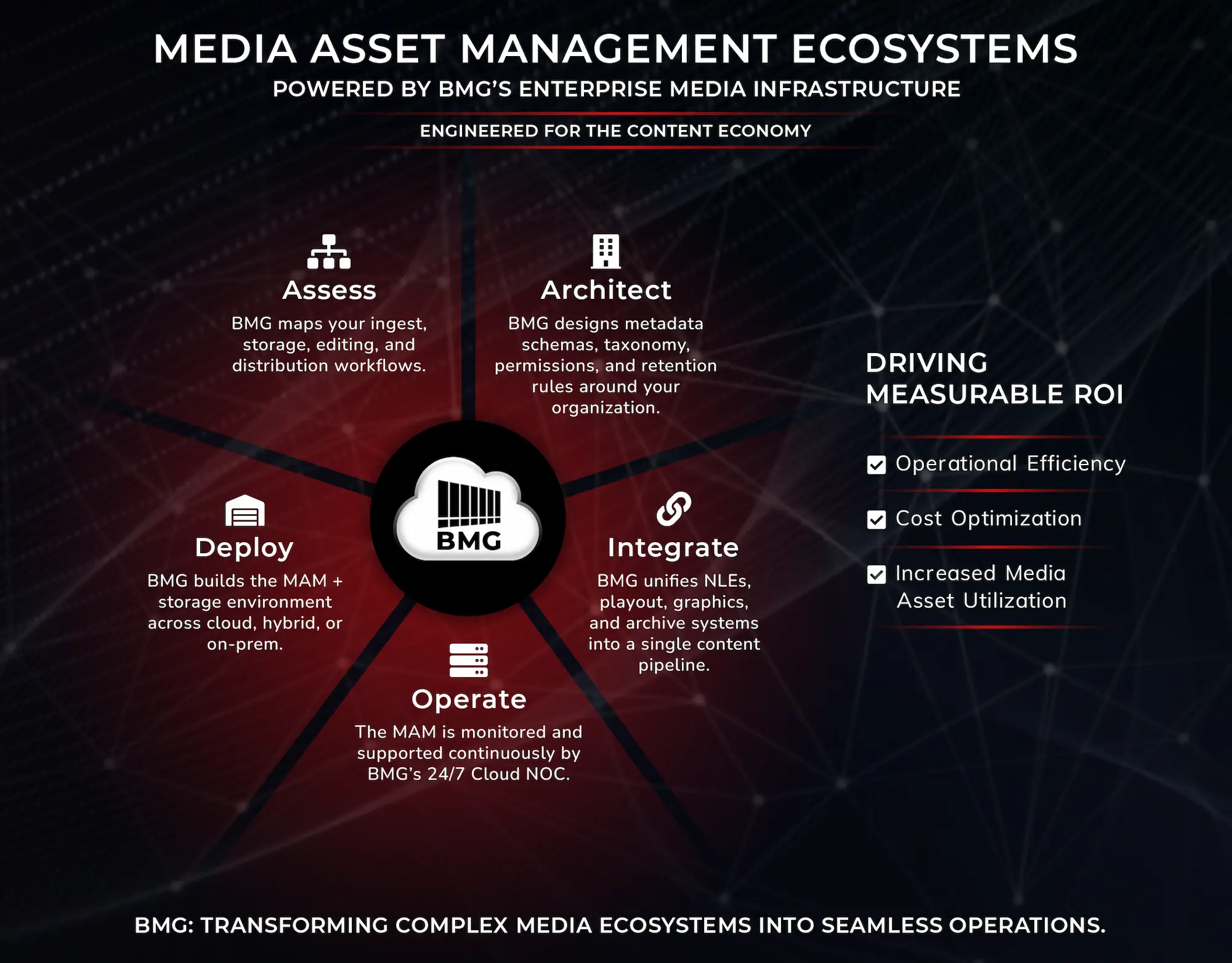
Assessment → architecture → vendor selection support → implementation → managed operations
A broadcaster or enterprise realizes their current MAM is failing—slow search, no automation, limited remote access, no clear archive strategy. We start with Media Asset Management Consultation & Assessment: workflow discovery, pain point analysis, requirements definition.
From there, we design architecture (cloud vs hybrid, storage tiers, metadata schema, integration points). We help evaluate vendors and platforms—translating marketing claims into operational reality. Once a system is selected, we support implementation and testing. Then we either hand off to internal ops or transition into Cloud MAM managed services for ongoing operations.
Archive modernization: migrating legacy libraries into a new MAM
An organization has decades of content on LTO tape, scattered drives, or aging on‑prem storage. They need it accessible, searchable, and integrated with current workflows—but migrating tens of thousands of hours without disrupting operations is complex.
We assess the archive, design a phased migration plan, and manage the process: tape retrieval, QC, metadata capture (manual or automated), ingest into the new MAM, and tier assignment. Once migrated, we can operate the MAM or hand off to internal teams.
Enterprise video programs: combining MAM + Enterprise Video Ops + NOC monitoring
A Fortune‑level company running monthly town halls, training series, and leadership programming realizes they’ve outgrown scattered storage and manual workflows. They need MAM for searchability and reuse, but they also need production support, monitoring, and operations management.
We design an integrated solution: Cloud MAM for content management, Enterprise Video & Content Operations for production staffing and studio operations, and NOC monitoring to ensure reliability for high‑stakes events. That turns fragmented video operations into a managed broadcast‑grade system.
5.3 What to bring to an initial conversation
We don’t need polished requirements documents. We need honest answers to a few questions so we can assess scope and recommend next steps.
Current storage landscape and platforms
What systems and storage are you using today? On‑prem SAN, NAS, cloud, LTO, scattered drives? Are you using any MAM or DAM platform now? If so, what’s working and what isn’t?
Rough estimates: hours of content, growth rate, user count, locations
How much content do you have? How fast is it growing? How many people need access—and from how many locations or offices? Rough numbers are fine. We’re scoping, not designing yet.
Known pain points and any prior MAM or DAM attempts
What’s broken or frustrating today? Can’t find assets? Slow retrieval? No remote access? Duplicated storage? Rights violations? Failed prior attempts to implement MAM?
Those pain points tell us where to focus and what mistakes to avoid.
Regulatory constraints or special requirements
Are you in a regulated sector (finance, government, healthcare) with specific retention, access control, or audit requirements? Do you have data residency constraints (content must stay in specific regions or jurisdictions)? Are there accessibility requirements (captions, transcripts, Section 508)?
Knowing that upfront shapes architecture and vendor discussions.
5.4 Next steps and resources
Start with a conversation or a self‑assessment
If you’re early in the process—evaluating whether you need MAM, exploring cloud vs on‑prem, or scoping requirements—start with Media Asset Management Consultation & Assessment. We’ll map your workflows, identify gaps, and recommend next steps.
If you already have MAM and need operational support, Cloud MAM managed services might be the right fit. We’ll assess your current system, define integration points, and propose a transition plan.
Related services that often pair with MAM
- Enterprise Video & Content Operations: For organizations combining MAM with production staffing, studio operations, and enterprise comms support.
- Cloud Master Control and Transmissions: For broadcasters and networks where MAM feeds playout and distribution.
- 24/7 Network Operations Center (NOC): For monitoring ingest, distribution, and delivery paths tied to MAM workflows.
- Production Control Rooms & Studios and Studio Design & Build: For facilities projects where MAM is part of broader infrastructure upgrades.
Schedule a MAM discovery call
Ready to explore what’s possible? Schedule a 30‑minute MAM discovery call. We’ll ask about your workflows, pain points, and goals, and give you an honest assessment of what makes sense for your organization.
Leave a Reply